AI Age Progression: See Yourself at 60
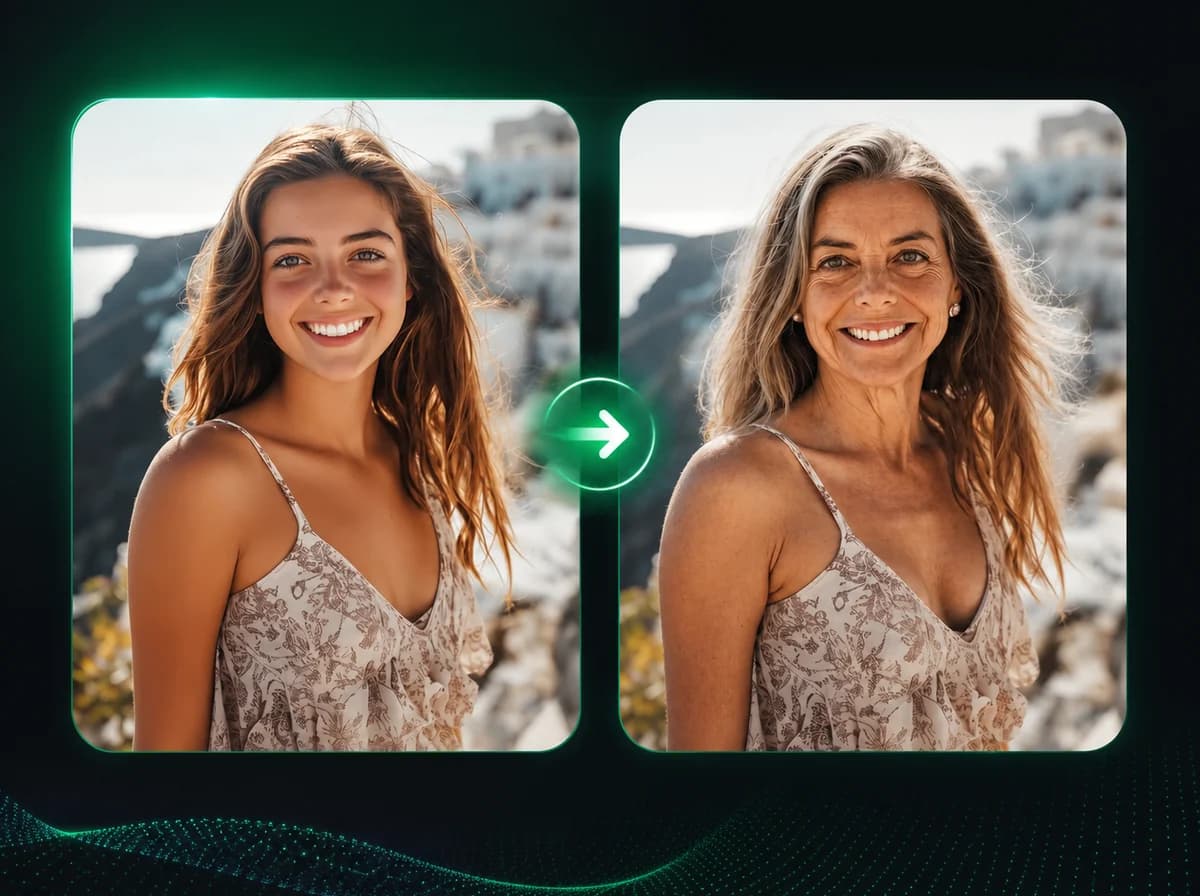
Upload a photo and generate an AI age progression preview of what that person may look like at 60. No settings or manual editing needed.
Click to upload image
PNG, JPG, WebP · Max 10MB
How to Use AI Age Progression in 3 Steps
Upload one photo, generate an age-60 preview, then download
Upload Your Photo
Upload a portrait with a clearly visible face. Front-facing photos with good lighting work best. Supported formats: PNG, JPG, WebP up to 10MB.
Let the AI Analyze
The AI reads the face — bone structure, skin, hair, and facial volume — and generates what that person may look like at 60. No parameters to configure.
Download the Result
Review your aged portrait after processing, then download the result with no watermark.
Why Choose iMideo AI Age Progression
One Photo, Zero Setup
No sliders to drag, no age range to enter. Upload a photo and the AI figures out the rest — skin, hair, structure — automatically.
Identity Stays Intact
Bone structure, eye shape, and core facial proportions are preserved. The aged result is still the same person — just 30 years further along.
Fast Online Preview
Upload, process, and download. The tool shows progress while the AI creates the age progression result.
Realistic, Not Filtered
Skin texture, hair color, and facial volume all change together as they would naturally. No harsh overlays or obvious seams.
Your Photos Stay Private
Images are processed for your age progression result and handled according to the product retention policy. They are not used for AI model training.
Use When Needed
No monthly subscription required. Create a future-self portrait whenever a project, campaign, or personal idea needs one.
What Our Users Say
Danielle M.
Content Creator
I posted an age progression video on TikTok and the comments were full of people asking which app I used. The result looked believable enough for a quick creative post.
Tom B.
Graphic Novel Artist
I'm working on a story that spans 40 years for the same characters. I needed aged reference images that still looked like the same people. This gave me a strong starting point without building every face manually in Photoshop.
Rachel K.
Family Photographer
Clients love seeing what their kids might look like in decades. I add it as a bonus to family shoots. The results are realistic enough that people genuinely react — it's not just a novelty filter.
James H.
Film Director
We needed aged versions of several characters for a documentary-style project. The tool produced usable reference material quickly enough for our concept review workflow.
Priya S.
UX Researcher
We were testing a financial planning app that showed users their future self. The AI age progression images made the concept tangible during user testing — people responded differently when they saw a realistic older version of themselves.
Lena W.
Instagram Creator
Did an age progression series on Instagram — me, my dog, my parents. The post drew a lot of comments because the results felt believable enough for people to ask how they were made.
Ahmed F.
Fiction Writer
I use these to visualize how my characters look at different life stages. Having a realistic aged portrait helps me write scenes more vividly, especially when a story spans decades.
Clara N.
Marketing Strategist
We used age progression images in a retirement savings campaign — showing people a realistic version of their future self to motivate action. The results were credible enough to use in actual campaign materials without further editing.
See What 60 Looks Like on You
Upload one photo and see a realistic AI prediction of how you may age, with no subscription and no watermark.