

Introduction
AI face swap technology has evolved from a novelty filter into a professional-grade creative tool in 2026. Whether you're a content creator looking to produce engaging social media videos, a filmmaker exploring cost-effective casting solutions, or simply curious about swapping faces with your favorite celebrities, understanding how to execute a realistic AI face swap is now an essential digital skill. This guide walks you through the entire process, from selecting the right source materials to troubleshooting common quality issues that plague amateur attempts.
The difference between a convincing face swap and an obvious fake often comes down to technique rather than tools. While AI algorithms handle the heavy computational lifting, your success depends on understanding facial geometry, lighting consistency, and motion tracking principles. In this tutorial, you'll learn how to create your first AI video face swap in under 10 minutes, master both static image and dynamic video workflows, and develop an eye for the subtle details that separate professional results from amateur experiments.
We'll cover everything from neural network fundamentals to platform-specific export settings, ethical considerations to legal compliance, and real-time troubleshooting for the most common artifacts like lighting mismatches and unnatural edge blending. By the end of this guide, you'll have the practical knowledge to produce face swaps that look natural across Instagram, TikTok, YouTube, and professional video projects.
Key takeaways
- Quality inputs determine output realism: High-resolution source images with frontal lighting and neutral expressions produce significantly better results than low-quality selfies or profile shots
- Video face swaps require frame consistency: Unlike static images, video workflows demand motion tracking and temporal coherence to avoid flickering between frames
- Lighting and skin tone matching are critical: The most common giveaway of amateur face swaps is mismatched lighting direction or color temperature between the swapped face and target body
- Ethical guidelines are non-negotiable: Always obtain consent before swapping someone's face, understand local deepfake laws, and consider watermarking commercial content
- Platform optimization matters: Instagram Reels, TikTok, and YouTube each have different compression algorithms that affect face swap quality—export settings should match your distribution channel
Understanding AI face swap technology: how neural networks detect and map facial features in 2026
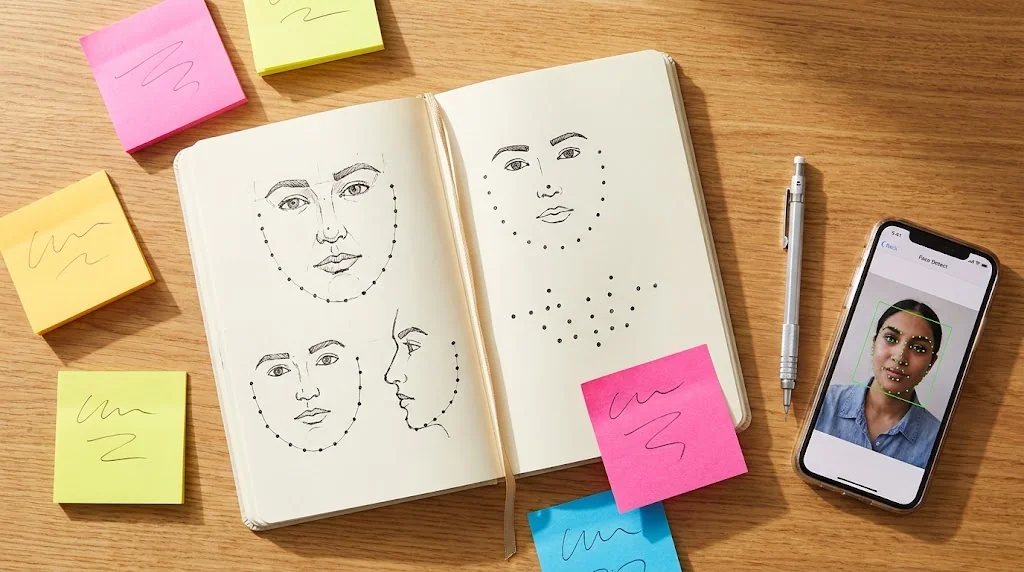
Modern AI face swap technology relies on deep learning architectures that have matured significantly since the early deepfake experiments of 2018. At its core, the process involves three neural network stages working in concert: facial detection, feature extraction, and blending. The detection stage uses convolutional neural networks trained on millions of faces to identify key landmarks (68 to 468 points depending on the model), including eye corners, nose tip, mouth edges, and jawline contours.
Once facial landmarks are mapped, the feature extraction phase creates a high-dimensional representation of both the source face (the one you want to apply) and the target face (the one being replaced). This representation captures not just geometric structure but also texture details, skin tone variations, and even subtle expressions. Advanced models in 2026 employ transformer architectures that understand contextual relationships between facial regions, which lets them preserve expression dynamics during the swap.
The blending stage is where the magic happens and where most amateur tools fail. Sophisticated ai video face swap systems use generative adversarial networks (GANs) to synthesize a new face that combines the source identity with the target's pose, lighting, and background context. This includes matching skin texture at the pixel level, adjusting color temperature to match ambient lighting, and feathering edges to eliminate the telltale "mask" effect that plagued earlier face swap attempts.
What separates 2026 technology from previous generations is temporal consistency in video processing. Modern algorithms don't just swap faces frame-by-frame—they track facial motion across the entire video sequence so that expressions, head movements, and even subtle muscle twitches remain coherent. This frame-to-frame awareness eliminates the flickering and morphing artifacts that made early deepfake videos easy to spot.
Understanding this technical foundation helps you make better decisions during the creation process. When you know that lighting consistency is algorithmically enforced, you'll prioritize source images with similar lighting to your target. When you understand that landmark detection drives the entire pipeline, you'll avoid obscured faces or extreme angles that confuse the neural network. This knowledge transforms you from a button-pusher into an informed creator who can predict and prevent quality issues before they occur.
Pre-production checklist: choosing source images/videos that guarantee realistic results
The single most important factor in AI face swap quality is your source material selection. Professional creators spend more time curating inputs than running the actual swap algorithm. Start with resolution: your source face image should be at least 1024×1024 pixels, with the face occupying at least 60% of the frame. Low-resolution inputs force the AI to interpolate missing detail, resulting in soft, artificial-looking skin texture that immediately signals a fake.
Lighting direction must match between source and target. If your source face is lit from the left with soft window light, swapping it onto a target video with harsh overhead fluorescent lighting will create an uncanny valley effect no algorithm can fix. Examine both materials carefully—note the position of catchlights in the eyes, the direction of nose shadows, and the overall color temperature. Warm golden-hour lighting doesn't mix well with cool office lighting.
Facial angle and expression matter more than most beginners realize. Frontal or three-quarter views work best; extreme profile shots confuse facial landmark detection. The source expression should be neutral or match the target's dominant expression. Swapping a laughing face onto a serious video creates expression conflicts that even advanced AI struggles to resolve naturally. For video targets, watch the entire clip and note the range of expressions—your source face should be capable of matching that emotional range.
Background complexity in your source image can introduce artifacts. Clean, simple backgrounds allow the AI to focus computational resources on facial detail rather than edge detection. If your source has a busy background, consider using background removal tools first. For video face swap projects, also evaluate motion intensity. Fast head movements, rapid camera pans, or motion blur will challenge even the best algorithms and may require higher-end processing options.
Finally, consider ethnic and age matching. While modern AI can technically swap any face onto any target, the most convincing results come from similar skin tones, facial structures, and age ranges. Swapping a 20-year-old face onto a 60-year-old body creates texture and wrinkle mismatches that break immersion. This isn't a technical limitation but a realism consideration—audiences subconsciously detect these incongruities even when they can't articulate why something looks "off."

AI Video Face Swap
Transform videos with AI face swap technology. Upload images to create realistic face replacements. Professional quality, fast processing, HD output.
Free to start • No credit card required • Professional quality

Step-by-step tutorial: creating your first photo face swap (desktop & mobile methods)
Let's start with a static image face swap, which is simpler than video and teaches fundamental principles. For desktop users, begin by organizing your materials: save your source face image and target image in a dedicated project folder. Open your chosen AI video face swap tool (most platforms offer both photo and video capabilities) and create a new project. Upload the target image first—this is the photo where you want to replace a face.
Step 1: Upload and verify detection. After uploading your target image, the AI should automatically detect all faces in the frame. Most tools highlight detected faces with bounding boxes or numbered markers. Verify that the face you want to replace is correctly identified. If multiple faces exist in the image, select the specific one you're targeting. Poor detection at this stage means you need a clearer target image.
Step 2: Upload source face. Now upload your source face image—the face you want to apply to the target. The system will extract facial features and create a mapping profile. Advanced tools show a preview overlay at this stage so you can verify alignment before processing. Check that eyes align with eyes, mouth with mouth, and that the overall scale looks proportional.
Step 3: Adjust blending parameters. Most professional tools offer sliders for blend strength, color matching, and edge feathering. Start with default settings, then fine-tune if needed. Increase blend strength if the swapped face looks "pasted on," but avoid going too high or you'll lose facial detail. Color matching should automatically adjust skin tone—manually override only if there's an obvious mismatch.
Step 4: Process and preview. Click generate or process. Depending on image resolution and server load, processing takes 10-60 seconds. Review the output carefully at 100% zoom. Look for telltale artifacts: unnatural edges around the hairline, color discontinuities at the jawline, or mismatched lighting on the nose and cheeks. If you spot issues, adjust parameters and reprocess rather than settling for a mediocre result.
Step 5: Export with appropriate settings. For social media sharing, export as JPEG at 90-95% quality to balance file size and visual fidelity. For professional use or further editing, choose PNG to preserve maximum detail. Some tools offer resolution upscaling at export—use this cautiously, as aggressive upscaling can introduce softness.
Mobile workflows follow a similar logic but with touch-optimized interfaces. Most apps use a simplified two-tap process: select target, select source, generate. The trade-off is less manual control over blending parameters, but modern mobile AI has become sophisticated enough that automatic settings work well for casual use. For serious projects requiring fine control, desktop workflows remain superior.
Advanced video face swap workflow: frame-by-frame consistency and motion tracking
Video face swaps introduce temporal complexity that static images don't face. The challenge isn't just swapping a face once—it's maintaining consistency across hundreds or thousands of frames while the subject moves, changes expression, and interacts with dynamic lighting. Professional ai video face swap workflows address this through motion tracking and temporal coherence algorithms.
Step 1: Video preprocessing. Before uploading to your face swap tool, trim your target video to the exact segment you need. Shorter clips process faster and reduce the chance of tracking errors. Check that the face remains visible throughout—if the subject turns completely away from camera or is obscured by objects, the AI will lose tracking and create jarring discontinuities. Stabilize shaky footage first if possible, as camera shake complicates facial landmark tracking.
Step 2: Upload and configure tracking. Upload both your target video and source face image. Advanced platforms will analyze the video and display a timeline showing face detection confidence across frames. Scrub through this timeline to verify consistent detection. If confidence drops in certain sections (due to motion blur, extreme angles, or occlusion), you may need to split the video and process segments separately.
Step 3: Set temporal smoothing. This critical parameter controls how much the AI considers adjacent frames when processing each frame. Higher smoothing values create more consistent results but may lag behind rapid movements. Lower values respond faster to motion but risk frame-to-frame flickering. For talking-head videos with minimal movement, use high smoothing (8-12 frames). For action sequences, reduce to 3-5 frames to maintain responsiveness.
Step 4: Process in batches. Video processing is computationally intensive. Most cloud-based tools process in batches, showing progress as a percentage. Processing time varies wildly based on video length, resolution, and server load—expect 1-5 minutes per minute of video at 1080p resolution. Higher resolutions or 60fps footage take proportionally longer. Avoid closing your browser during processing, as this may cancel the job.
Step 5: Quality check and refinement. Once processing completes, download and review the full video at native resolution. Watch for three common issues: flickering (face appearance changes between frames), tracking drift (face gradually misaligns over time), and expression lag (swapped face doesn't match target expressions quickly enough). If you spot problems in specific sections, many tools allow reprocessing just those segments with adjusted parameters.
Step 6: Post-processing touches. Consider subtle color grading to further blend the swapped face with the overall video aesthetic. Slight saturation reduction or warm/cool tint adjustments can mask minor color mismatches. Add a subtle film grain overlay if the swapped face looks too digitally smooth compared to the rest of the footage. These finishing touches can turn good results into professional quality.
AI Video Face Swap
Transform videos with AI face swap technology. Upload images to create realistic face replacements. Professional quality, fast processing, HD output.
Free to start • No credit card required • Professional quality
Fixing common problems: correcting lighting, skin tone, and edge artifacts
Even with perfect source materials, face swap artifacts happen. Learning to diagnose and fix them separates amateur results from professional work. The most common issue is lighting direction mismatch. If your source face has light coming from the right but the target body is lit from the left, the result looks like a mask. The fix isn't in the AI tool—you need to either choose a different source image or use photo editing software to flip/adjust the source face's lighting before uploading.
Skin tone mismatches occur when the AI's automatic color matching fails. This happens frequently with mixed lighting (indoor/outdoor) or when source and target have significantly different undertones. Most tools offer manual color correction sliders. Adjust hue first to match warmth (yellow/pink tones), then saturation to match skin intensity, finally brightness to match exposure levels. Make adjustments in small increments—overcorrection looks worse than slight mismatches.
Edge artifacts (visible seams where the swapped face meets the original head) plague rushed jobs. These appear as hard lines, color discontinuities, or unnatural blurring around the jawline and hairline. Increase edge feathering in your tool's settings, which softens the transition zone. If feathering alone doesn't help, the issue may be resolution mismatch: your source face resolution is lower than the target, forcing the AI to upscale and creating soft edges. Solution: use a higher-resolution source image.
Expression mismatch in video creates an uncanny valley effect where the face seems emotionally disconnected from the body language. This isn't always fixable in post—it requires better source material selection. Choose source faces with neutral expressions for targets with varied expressions so the AI has more flexibility to adapt. For specific expressions (laughing, surprised, angry), source faces matching that expression produce more convincing results.
Flickering in video face swaps indicates insufficient temporal smoothing. Return to your tool's settings and increase the temporal coherence parameter. If your tool doesn't offer this control, you're using a consumer-grade platform—consider upgrading to a professional tool for video work. As a last resort, export individual problem frames, fix them manually in photo editing software, then splice them back into the video, though this is labor-intensive.
Ethical guidelines and legal considerations: consent, deepfake laws, and watermarking
AI face swap technology exists in a complex ethical and legal landscape that every creator must navigate responsibly. The fundamental principle is consent: never swap someone's face without their explicit permission unless it clearly falls under parody, satire, or artistic expression protected by local laws. Even in protected categories, consider the potential harm—just because something is legal doesn't make it ethical.
Deepfake laws vary dramatically by jurisdiction. As of 2026, many US states have enacted legislation criminalizing malicious deepfakes, particularly those involving sexual content, political misinformation, or fraud. The EU's AI Act classifies certain deepfake applications as high-risk and requires transparency disclosures. China mandates watermarking of AI-generated content. Before publishing face swap content, research laws in both your location and your audience's primary jurisdictions.
Watermarking and disclosure represent best practices even where not legally required. Many professional creators add subtle "AI-generated" disclaimers to video descriptions or overlays. This transparency builds audience trust and protects you from accusations of deception. Some platforms like YouTube and TikTok are implementing mandatory disclosure features for synthetic media—get ahead of these requirements by voluntarily labeling your work.
Commercial use introduces additional considerations. Using a celebrity's face in a face swap for commercial purposes (advertising, paid content, merchandise) almost certainly requires licensing rights you don't have. Even using a friend's face in a monetized YouTube video technically requires a model release. For commercial projects, work with professional talent who sign appropriate releases, or use stock face libraries offered by some AI platforms.
The ethical principle of "do no harm" should guide all face swap projects. Ask yourself: could this content be used to harass, defame, or deceive? Could it damage someone's reputation or relationships? If the answer is yes or even maybe, reconsider the project. The technical ability to create something doesn't create a moral right to publish it. Responsible creators self-regulate beyond legal minimums, understanding that today's viral joke can become tomorrow's harassment case study.
Exporting and sharing: optimal settings for different platforms (Instagram, TikTok, YouTube)
Each social platform applies different compression algorithms that can degrade face swap quality if you don't optimize export settings. Instagram Reels aggressively compresses uploads, particularly at lower resolutions. Export your face swap video at 1080×1920 (vertical) or 1080×1080 (square) at the highest bitrate your tool allows—typically 10-15 Mbps for 1080p. Use H.264 codec with High profile for maximum compatibility. Avoid uploading 4K to Instagram; it will be downscaled anyway, and the extra data increases compression artifacts.
TikTok's compression is slightly less aggressive but favors shorter clips. For free ai video face swap content on TikTok, keep videos under 60 seconds when possible—longer videos get compressed more heavily. Export at 1080×1920, 30fps (60fps offers minimal visible improvement after TikTok's processing), H.264 codec, 8-12 Mbps bitrate. TikTok's algorithm also favors content uploaded directly from mobile devices, so consider transferring your desktop-created video to your phone before uploading rather than using desktop web upload.
YouTube offers the highest quality preservation of major platforms, supporting up to 4K resolution and higher bitrates. For face swap content, 1080p at 15-20 Mbps strikes the best balance between quality and upload time. If your source materials support it and you want maximum quality, export at 1440p or 4K—YouTube's compression algorithm handles high-resolution content better than upscaled 1080p. Use H.264 for broadest compatibility or H.265 (HEVC) for better compression at equivalent quality, though some older devices struggle with HEVC playback.
For all platforms, maintain a constant frame rate matching your source video (typically 24, 25, or 30fps). Variable frame rate exports can cause sync issues and stuttering playback. Disable any "optimize for web" or "fast start" options that move metadata to the file beginning—while these help browser playback, they can trigger additional platform recompression. Always keep a master copy at maximum quality before creating platform-specific exports, as you'll want to re-export if platform requirements change or you want to share on additional channels.
Audio considerations matter too, even though face swap primarily affects video. Export with AAC audio codec, 192-256 kbps bitrate, 48kHz sample rate. Lower audio bitrates sound noticeably worse on platforms like YouTube that preserve audio quality better than video. If your face swap includes synchronized dialogue, double-check lip sync after platform upload—compression can occasionally introduce slight audio-video desync that wasn't present in your export.
Conclusion
Mastering AI face swap in 2026 requires more than just access to advanced tools—it demands understanding the technical principles behind neural face mapping, developing an eye for quality source materials, and cultivating ethical responsibility in content creation. The workflows outlined in this guide provide a foundation for both static image and dynamic video projects, but true expertise comes from practice and continuous refinement of your technique.
The gap between amateur and professional face swap results isn't primarily about which AI tool you use, but how you use it. Attention to lighting consistency, careful source material selection, proper temporal smoothing in video projects, and platform-specific optimization separate forgettable content from viral-worthy creations. As you experiment with face swap technology, build a reference library of successful swaps—analyze what made them convincing and apply those lessons to future projects.
Remember that with great creative power comes significant ethical responsibility. The same technology that enables harmless entertainment and artistic expression can be weaponized for deception and harm. Always prioritize consent, comply with local regulations, and consider the broader impact of your work. The face swap community's long-term viability depends on responsible creators setting positive precedents.
Ready to create your first professional-quality face swap? Start with the photo workflow to build fundamental skills, then progress to video projects as you gain confidence. The try ai video face swap online tools available in 2026 have democratized access to technology that was restricted to Hollywood studios just five years ago—take advantage of this creative opportunity while respecting its boundaries.
Frequently asked questions
What is AI face swap and how does it work?
AI face swap is a technology that uses deep learning neural networks to replace one person's face with another's in images or videos. The process involves three stages: facial detection (identifying key landmarks like eyes, nose, mouth), feature extraction (capturing the unique characteristics of both source and target faces), and blending (using generative algorithms to merge the source face onto the target while matching lighting, skin tone, and expression). Modern systems in 2026 employ transformer architectures and GANs to create realistic results that preserve motion and expression dynamics.
Is AI face swap the same as a deepfake?
AI face swap and deepfake refer to the same underlying technology, but the terms carry different connotations. "Face swap" typically describes benign, entertainment-focused applications like swapping faces with friends or celebrities for fun. "Deepfake" has become associated with malicious uses—non-consensual pornography, political misinformation, or fraud. Technically, they use identical neural network architectures; the distinction is purely about intent and application. Responsible creators should be aware that even innocent face swaps can be misused, which is why consent and disclosure are critical.
Can I face swap videos for free?
Yes, several platforms offer free video face swap capabilities with limitations. Free tiers typically restrict video length (30-60 seconds), resolution (720p max), or add watermarks to outputs. Free tools also usually have lower processing priority, meaning longer wait times during peak usage. For casual experimentation, free options work well. Professional creators producing content for commercial use or requiring high quality should invest in paid tools that offer 1080p/4K processing, longer videos, batch processing, and advanced controls like temporal smoothing and manual color correction.
What is the best face swap app in 2026?
The "best" face swap app depends on your specific needs. For mobile convenience and social media content, apps with streamlined interfaces and quick processing work well. For professional video projects requiring fine control, desktop platforms with advanced parameters and high-resolution output are superior. Key factors to evaluate include processing quality (realism of results), speed (wait time for outputs), resolution support (1080p vs 4K), video length limits, pricing model (subscription vs pay-per-use), and ethical features like watermarking and consent verification. Test multiple options with your specific source materials before committing to a paid plan.
Is it legal to face swap someone without consent?
Legal status varies by jurisdiction and context. In general, face swapping someone without consent for private, non-commercial use exists in a legal gray area—not explicitly illegal but potentially actionable under harassment or privacy laws if the subject objects. Publishing face swap content without consent, especially for commercial purposes or in ways that could damage reputation, is increasingly illegal under deepfake-specific legislation enacted in many regions since 2023. Parody and satire may have legal protections depending on local laws, but these defenses are narrow and fact-specific. Best practice: always obtain explicit consent before swapping someone's face, regardless of legal requirements. The ethical standard is higher than the legal minimum.
Related face swap guides
Continue with these focused guides if you are choosing a face swap workflow or troubleshooting specific use cases: